How does QR table ordering work, with no app?
Each table has a QR code. A guest scans it with the phone's camera and your menu opens in the phone's browser, with no app, account or sign-up. With WaiterPilot the guest then orders by chat: they ask questions, answer the choices a dish needs and tap Confirm. The order appears on your staff board, your team confirms it and sends it to the kitchen, and the guest follows its status on the phone.
Updated
What does the guest do on their phone?
Scan, ask, order, confirm and follow the order. Nothing is installed, and nothing reaches your team until the guest taps Confirm.
Scan the table's QR code
The phone's camera reads the code on the table card and opens your menu in the browser. Each table has its own code, so your staff know which table is ordering.
Ask about the menu
The guest can browse, or just write a question: is it spicy, is it vegetarian, what comes with it. Answers come from your menu; when the menu doesn't say, the chat tells the guest to ask a member of staff.
Order in their own words
The guest writes the order the way they'd say it to a server, in their own language. WaiterPilot asks about required choices, such as the side or how a steak is cooked, and builds the cart. An order can't be confirmed until every required choice is picked.
Review the order and tap Confirm
The guest checks the order card and taps Confirm. The order then waits on your staff board; the first order at each table is always checked by a person. While it waits, the guest can still cancel it.
Awaiting staffFollow the order, call a waiter, ask for the check
The phone shows the order moving to In kitchen and then Served, and the chat explains each step in the guest's language. From the same screen the guest can call a waiter, ask for the check and see the live bill.
In kitchen
What does the guest actually see?
A chat with your menu behind it. The header has buttons to call a waiter, ask for the bill and get help; tabs switch between Chat, Menu and Bill; and the guest buttons switch between English and Arabic.
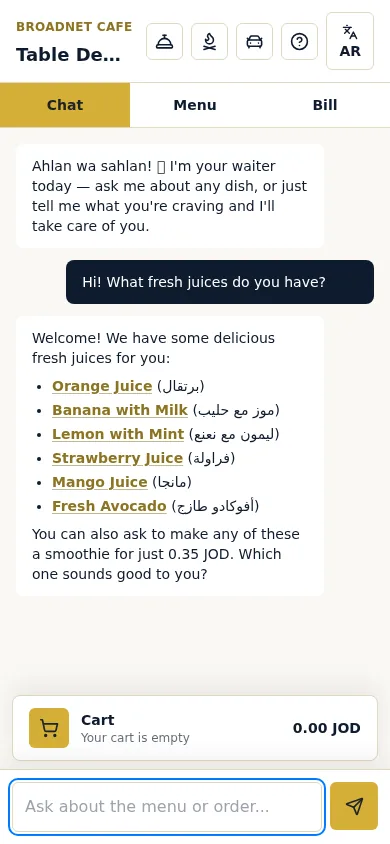
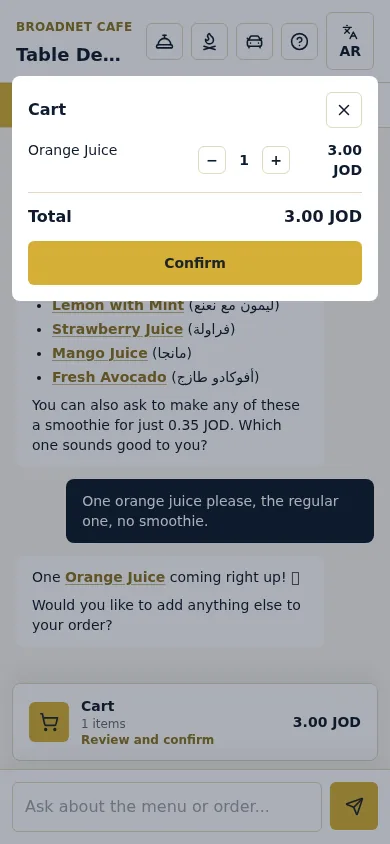
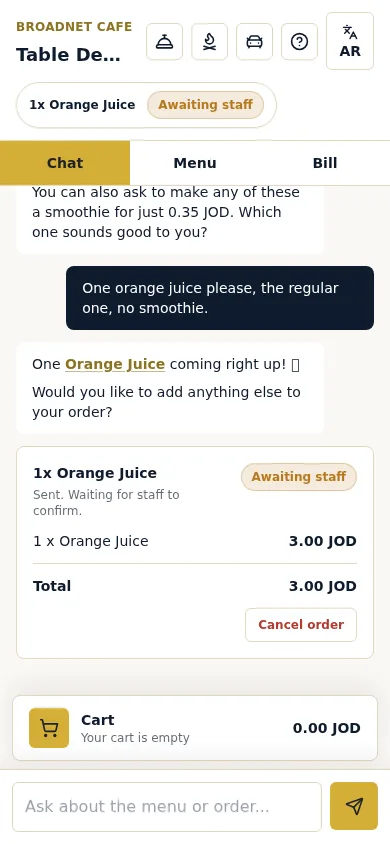
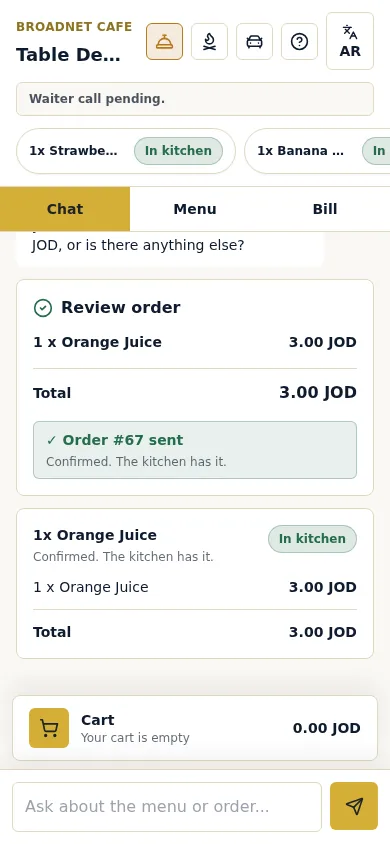
Real screenshots, 15 October 2026, at Broadnet Cafe, BroadNet.AI's demo restaurant (prices in Jordanian dinars).
What's the difference between a QR menu, QR ordering and order-and-pay?
"QR code ordering" covers four different things. A QR menu only shows the menu; form-based QR ordering is a tap-to-add cart; conversational QR ordering takes the order by chat; integrated order-and-pay puts ordering and payment inside a POS.
| QR menu (PDF or web page) | Form-based QR ordering | Conversational QR ordering | Integrated order-and-pay | |
|---|---|---|---|---|
| How the guest orders | Reads the menu, then orders with a server | Taps dishes and options into a cart | Writes in their own words; the chat asks about choices and sums up | Taps dishes into a cart on the POS vendor's ordering page |
| Questions about a dish | Asked to a server | Only what's written on the item | Asked in the chat and answered from your menu; when the menu doesn't say, the guest is told to ask staff | Only what's written on the item |
| Where the order goes | The server's notepad or handheld | The vendor's dashboard, screen or printer | WaiterPilot: its staff board and kitchen screen | The POS, kitchen printers and screens |
| Payment | At the till | Varies; some take payment | WaiterPilot: none; a live bill guests can split, paid to your staff | On the phone, through the vendor |
| POS needed? | No | Varies | WaiterPilot: no, and there is no POS connection either | Yes, the vendor's own |
| Guest's language | Whatever you translated | Varies; some translate the menu | WaiterPilot: guests chat in their own language (tested in English, Arabic and Spanish); buttons are English or Arabic | Rarely stated |
| Examples, as of October 2026 | Any QR code generator | MENU TIGER | WaiterPilot; also Butlaroo, Ordder's AI Waiter, AI-Waiter.com | Toast Mobile Order & Pay, Square self-serve ordering, Lightspeed Order Anywhere |
Vendor details from their own pages, checked 15 October 2026: Toast Mobile Order & Pay FAQ, Square self-serve ordering, Lightspeed Order Anywhere, MENU TIGER pricing, Butlaroo AI waiter, Ordder pricing. Features change, so check before you buy.
How does a QR order reach the kitchen?
With WaiterPilot, a confirmed order lands on the staff board as Awaiting staff. Your team confirms it and it moves to the kitchen screen, which shows quantities, dishes, options and notes without prices.
There is no kitchen printer or POS in that path. WaiterPilot runs its own screens on phones or tablets you already have. If you use a POS for sales and reports, someone on your team rings the order in there as well.
How fast? Within seconds: in our tests on 15 October 2026, four confirmed orders reached the staff board in 0.8 to 2.7 seconds. The first order at a table then waits for a person on purpose, and waiting tickets change colour at 1, 5 and 10 minutes so nobody misses one.
Staff can Reject a first order that looks wrong, such as a duplicate or the wrong table, and mark a dish Out of stock if the kitchen runs out after it was ordered; it comes off the guest's bill. The owner can mark a dish sold out from a phone before anyone orders it, and the chat stops offering it.
Later orders from a table that already has a confirmed order can go straight to the kitchen. The full sequence, with what staff do at each state and what happens when a dish runs out, is on how it works.
What does a restaurant need for QR table ordering?
A reliable connection, a QR card on every table, a phone or tablet for the staff board and the kitchen, and clear staff roles. There is no hardware to buy.
- Wi-Fi or mobile data. Guests' phones and your staff screens both need a connection. Check reception at the table farthest from the router and in the kitchen. Where mobile signal is weak, put your guest Wi-Fi name and password near the QR code.
- A QR card on every table. We print them for you as part of the free setup, in three sizes including a table-stand card, with a printable staff guide.
- A phone or tablet for the main board. It shows every ticket by status. Put it where the person confirming orders sees it during service.
- A screen in the kitchen. The kitchen screen shows quantities, dishes, options and notes, without prices. A phone or tablet you already own will do.
- Someone on the floor screen. Waiter calls and check requests appear there within seconds; a check request shows whether the guest will pay by cash or card. Whoever watches it taps Ack and goes to the table. See waiter call and bill.
- Staff roles agreed before service. Who confirms first orders, who reads notes in other languages, who rings sales into your till, and who answers allergy questions at the table. The onboarding checklist walks through it, with a test night.
- Your menu, loaded and checked. Send us your menu as a PDF or photos; we load it during setup and you check it before going live. Check dish names, options and descriptions, because the chat answers from them.
- Your printed menu. Keep it. QR ordering works alongside it, not instead of it.
Do you still need a printed menu?
Yes. WaiterPilot works alongside your printed menu, not instead of it: some guests prefer paper, and some places require a printed menu or price list.
Guests are split on QR codes. In the National Restaurant Association's Restaurant Technology Landscape Report 2024, 59% of US full-service diners said they would open a menu by QR code and 48% would order with one. Among baby boomers, only 21% would order by QR. A printed menu and a server who will take the order keep every guest served.
Some places go further. Local rules in Turkey and in parts of Brazil expect a printed menu or price list to be available, so a QR-only menu isn't an option there. Check the rules where you operate; the safe default everywhere is a printed menu on hand and QR ordering next to it.
What if a guest has no data, a flat battery or no phone?
Staff take the order the way they do today. QR ordering adds a way to order; it doesn't remove the server.
A guest who can't or doesn't want to scan orders with a server, from the printed menu, and you ring that order up as you do now. At a table where only one person has a working phone, that person can order for everyone by chat, or a server can take the order.
WaiterPilot runs in the browser, so both the guest's phone and your staff screens need a connection. If your internet drops, fall back to the printed menu and a notepad until it's back, the way you'd plan for a card terminal going offline. This is true of browser-based QR ordering in general: as of October 2026, Toast's own FAQ says order and payment processing through its Mobile Order & Pay is not supported during an internet outage.
Is conversational QR ordering right for your restaurant?
It fits table-service restaurants whose guests ask about the menu or don't read its language, and that can keep payment and the till as they are. It doesn't fit if guests must pay on the phone or every order must land in your POS.
- Choose it if guests ask a lot about dishes, many don't read your menu's language, servers are stretched at peak times, and you want a flat monthly price with 0% commission.
- Choose POS order-and-pay if guests should pay at the table, or every order must print in the kitchen or land in your POS with no re-entry. See compare.
- Choose a plain QR menu if you only want guests to read the menu and a server will still take every order.
- Before you decide ask every vendor the twelve questions in the buyer's checklist, and test them on your own menu.
Questions about QR table ordering
Do guests need to download an app or create an account?
No. The menu opens in the phone's browser after the scan. There is no app, no account and no sign-up, and guests aren't asked for a phone number.
Can a guest cancel or change an order?
A guest can cancel an order while it is still Awaiting staff. After staff confirm it, the guest calls a waiter from the phone; staff can mark a dish Out of stock, which takes it off the bill.
Can several guests at one table order from their own phones?
Yes. Each guest can scan and order, and the live bill can be split evenly, or each guest can see just their own share.
How does the order get to the kitchen?
It lands on WaiterPilot's staff board as Awaiting staff within seconds (0.8 to 2.7 seconds in our four test orders on 15 October 2026). Staff confirm it and it moves to the kitchen screen. Later orders from that table can go straight to the kitchen.
Does QR table ordering take payment?
Some systems do; WaiterPilot doesn't. Guests see a live bill with tax and any service charge you set, can split it and ask for the check from the phone, then pay as they do today.
Do I need new hardware?
No. Guests use their own phones, and staff use phones or tablets you already have. We print the QR cards.
How long does setup take?
Most restaurants are live within two weeks of the first call, including loading your menu, printing QR cards and training your staff, all free.
What does it cost?
The first 30 days are free. Then it's $200 per location per month, with 0% commission on orders and no contract.
What should you read next?
- From scan to servedOrder states, staff screens and exceptions.
- What is an AI waiter?Conversational ordering compared with QR menus, robots, voice bots and POS order-and-pay.
- Multilingual orderingWhat the guest sees in their own language, and what stays in yours.
- Works with your POSHow the sale gets into your till.
- Waiter call and billCalls, check requests and the live bill guests can split.
- Buyer's checklistTwelve questions to ask any QR ordering vendor.
- Onboarding checklistSetup, QR cards, staff roles and the first night.
- Compare table ordering toolsToast, Square, MENU TIGER, Ordder and where each fits.
- GlossaryQR menu, order-and-pay, KDS and other terms.
- How much does QR code ordering cost?Flat fee vs commission, with worked examples.
- PricingOne flat price per location, 0% commission.